BISP Registration Check by CNIC
Every year, thousands of deserving families across Pakistan wonder whether they have been successfully registered under the Benazir Income Support Programme. The process of confirming enrollment can feel confusing — especially for those in rural areas with limited access to information. That is exactly why knowing how to do a BISP registration check by CNIC has become such a critical piece of knowledge for low-income households throughout the country.
This guide breaks down everything a beneficiary — or their family member — needs to know about verifying BISP registration status using their Computerised National Identity Card (CNIC). From the official web portal to SMS-based methods, every option is explained clearly, step by step, in plain language.
Understanding BISP and Why Registration Verification Matters
The Benazir Income Support Programme (BISP) was established in 2008 with a straightforward mission: to provide financial assistance to the poorest and most vulnerable households in Pakistan. Over the years, it has grown into one of the largest social protection programmes in South Asia, supporting millions of women-led households with quarterly cash transfers under initiatives like the Kafaalat programme.
However, being deserving does not automatically mean being registered. Many eligible families miss out on benefits simply because they are unaware of their registration status or assume they have been enrolled when they have not. Performing a regular BISP registration check by CNIC ensures that no family loses out on financial aid they rightfully deserve.
The Role of CNIC in BISP Registration
In Pakistan’s social welfare infrastructure, the Computerised National Identity Card issued by NADRA serves as the primary identifier for every citizen. When it comes to BISP, the CNIC is the backbone of the entire registration and verification system. Every beneficiary is registered against their unique 13-digit CNIC number, which means any status check — whether online or through SMS — runs through that same identification number.
This is why maintaining a valid, up-to-date CNIC is considered a prerequisite for anyone seeking to confirm their BISP registration status. An expired or incorrectly recorded CNIC can lead to failed verification attempts, even if the person is genuinely enrolled.
What Does “Registration Check” Actually Mean?
When someone performs a BISP registration check by CNIC, they are essentially asking the BISP system two things: first, is the person with this CNIC number listed as a registered beneficiary? And second, what is the current status of their registration — active, suspended, pending, or disqualified? Understanding this distinction helps beneficiaries take the right next step depending on the result they receive.
Method 1: BISP Registration Check by CNIC Through the Official Web Portal
The BISP official website remains one of the most reliable and widely used platforms for conducting a BISP registration check by CNIC. It is accessible from any device with an internet connection — a smartphone, tablet, laptop, or desktop computer — and provides real-time data from the BISP database.
Step-by-Step Process for the Online Portal
- Open any internet browser and navigate to the official BISP website: bisp.gov.pk.
- On the homepage, locate the section titled “Beneficiary Status” or “Check Registration Status.”
- A text field will appear asking for the CNIC number. Enter the beneficiary’s 13-digit CNIC — without any dashes or spaces.
- If a CAPTCHA verification is displayed, complete it to confirm the submission is legitimate.
- Click on the “Check Status” or “Submit” button.
- The portal will load the registration details associated with that CNIC number within a few seconds.
What Information Is Shown After the BISP Registration Check?
Once a successful BISP registration check by CNIC is completed on the portal, the system returns a detailed status summary. The table below outlines what beneficiaries can expect to see:
| Data Field | Description |
|---|---|
| Beneficiary Name | The registered name as it appears on the CNIC |
| Registration Status | Active, Pending, Not Eligible, or Disqualified |
| Programme Name | Kafaalat, Taleemi Wazaif, NSER, or others |
| CNIC Number | Shown in masked format for security |
| Last Payment Date | Date of the most recently processed disbursement |
| District / Division | Registered location under BISP records |
Method 2: BISP Registration Check by CNIC via SMS to 8171
Not everyone has consistent access to the internet — and the Government of Pakistan has acknowledged this reality by offering a fully functional SMS-based service for BISP registration checks. This method uses the government’s dedicated 8171 helpline and requires nothing more than a basic mobile phone and a valid SIM card.
How to Send the SMS for BISP Registration Verification
Performing a BISP registration check by CNIC through SMS is incredibly straightforward. Here is how it works:
- Open the messaging application on any mobile phone.
- In the message body, type the beneficiary’s 13-digit CNIC number — no spaces, no dashes.
- Send this message to 8171.
- Wait for the automated reply, which typically arrives within two to five minutes.
- The response message will contain the BISP registration status, programme details, and relevant payment information.
Understanding the 8171 Response Message
The automated SMS reply from 8171 is written in simple Urdu or English and contains key details about the beneficiary’s registration status. Common responses include confirmation of an active registration, a notification that the CNIC is not found in the system, or an indication that the account is currently under review. If no reply is received within fifteen minutes, the beneficiary is advised to resend the message or try the web portal as an alternative.
Method 3: Checking BISP Registration Status Through the Ehsaas Mobile App
The Pakistani government’s digital transformation efforts have extended to mobile applications. The Ehsaas Programme app — which covers a wide range of social protection services including BISP — allows users to conduct a BISP registration check by CNIC directly from their smartphone. This method is ideal for younger family members who assist elderly or less tech-savvy beneficiaries.
Steps to Use the Ehsaas App for Registration Verification
- Search for “Ehsaas Programme” on the Google Play Store (for Android) or Apple App Store (for iOS).
- Download and install the official application from the Government of Pakistan.
- Launch the app and navigate to the “Check Beneficiary Status” section.
- Enter the 13-digit CNIC number of the registered beneficiary.
- Tap “Verify” or “Check” and allow the app a moment to retrieve the data.
- The screen will display the registration status, programme name, and the most recent disbursement record.
Method 4: In-Person BISP Registration Check at a Tehsil Office
For those who prefer face-to-face assistance, visiting a nearby BISP Tehsil Office is always a valid option for conducting a BISP registration check by CNIC. BISP has offices across all major tehsils and districts of Pakistan, staffed with trained personnel who can pull up registration records on behalf of visitors.
Documents Required for an In-Person Registration Check
Before heading to the office, beneficiaries should prepare the following:
- Original CNIC — this is mandatory for any in-person verification
- A photocopy of the CNIC in case the office needs to retain records
- Any previous BISP documentation, letters, or payment receipts if available
- A contact number so that office staff can follow up if needed
The in-person method is particularly recommended for beneficiaries who have received conflicting information from online sources, or those who have recently completed the NSER (National Socio-Economic Registry) survey and are waiting for their registration to be confirmed.
Common Reasons a BISP Registration Check by CNIC May Show Issues
It is not uncommon for beneficiaries to encounter unexpected results when running a BISP registration check by CNIC. Here are the most frequently reported issues and what they typically mean:
1. “CNIC Not Found” in the System
This result usually indicates one of two things: either the person has not yet participated in the NSER survey, or their CNIC number was entered with an error. Beneficiaries who receive this message should first double-check the number being submitted and then confirm whether they have been surveyed. If they have been surveyed and the problem persists, contacting the 8171 helpline for manual assistance is the recommended next step.
2. Status Showing “Not Eligible”
A “not eligible” result on a BISP registration check by CNIC does not always mean permanent disqualification. Eligibility is determined by the Poverty Score Card assigned during the NSER survey. Families whose socio-economic circumstances have changed significantly may request a re-survey by approaching their nearest BISP office and explaining their situation.
3. Registration Status Listed as “Suspended”
A suspended status can occur for a number of reasons — including discrepancies in CNIC records, failure to collect payments for an extended period, or administrative reviews. Beneficiaries in this situation are urged to visit the BISP Tehsil Office with their original CNIC and any supporting documentation to resolve the issue.
4. Expired CNIC Causing Verification Failure
An expired CNIC is one of the most avoidable causes of failed registration checks. Since the BISP system is synced with NADRA databases, an expired identity card can disrupt the verification process. Renewing the CNIC through NADRA before attempting another BISP registration check by CNIC is strongly recommended.
5. Portal or SMS Service Temporarily Unavailable
Occasionally, the BISP online portal or the 8171 SMS system may experience technical downtime. In these cases, the beneficiary should wait a few hours and retry. Alternatively, visiting a BISP office or using the Ehsaas mobile app can serve as effective backup methods.
How the NSER Survey Connects to BISP Registration
The National Socio-Economic Registry (NSER) survey is the gateway through which households enter the BISP system. Conducted by BISP teams going door to door, the survey collects information about a household’s income, assets, education level, and living conditions. Based on this data, a Poverty Score Card is generated. Households falling below the defined poverty line are then registered under BISP.
What Happens After the NSER Survey?
After participating in the NSER survey, a household typically waits several weeks before their registration is processed and reflected in the system. During this waiting period, running a BISP registration check by CNIC through the portal or 8171 will eventually begin returning a result — either confirming eligibility or indicating the application is still under review.
BISP Programmes That Can Be Checked Through CNIC Verification
A BISP registration check by CNIC does not just confirm basic eligibility — it can also reveal which specific programme or programmes a beneficiary is enrolled in. Here is a brief overview of the main BISP initiatives:
| Programme Name | Target Group | Type of Support |
|---|---|---|
| Kafaalat | Registered women from low-income households | Quarterly cash transfer via HBL/ATM card |
| Taleemi Wazaif | School-going children of registered beneficiaries | Conditional cash transfer for school attendance |
| NSER Registration | All households in Pakistan | Eligibility determination for BISP benefits |
| Nashonuma | Pregnant/breastfeeding women and children under 2 | Nutritional support and conditional transfers |
| Interest-Free Loans | Active BISP beneficiaries | Micro-financing for small business development |
Frequently Asked Questions About BISP Registration Check by CNIC
Can a family member check registration status on behalf of a beneficiary?
Yes. Since the BISP registration check by CNIC only requires the 13-digit CNIC number to be submitted, any family member who has access to that information can run the check through the portal, SMS, or app. This is especially common in households where the registered beneficiary — typically an older woman — may not be familiar with using smartphones or the internet.
How often should a beneficiary check their registration status?
It is a good practice to perform a BISP registration check by CNIC at least once per quarter — particularly around the time when payments are expected to be disbursed. This helps beneficiaries confirm that their status remains active and that no unexpected changes have occurred in the system.
Is the 8171 SMS service available 24/7?
Yes. The 8171 helpline SMS service operates around the clock, every day of the week. Beneficiaries can send their CNIC number at any time of day or night, and the automated system will respond with the relevant registration and payment details.
What if the registration status is correct online but payments are not being received?
If a BISP registration check by CNIC confirms an active status but payments are still not being received, the beneficiary should visit the nearest BISP payment center or Tehsil Office. There could be a technical issue with the linked bank account or HBL Konnect card that needs to be resolved in person.
How to Protect Personal CNIC Information During a Registration Check
As BISP services have moved increasingly online, protecting personal information has become more important than ever. Beneficiaries and their family members should be mindful of the following precautions when conducting a BISP registration check by CNIC:
- Only use the official BISP website (bisp.gov.pk) — avoid clicking on links shared through WhatsApp groups or unknown text messages that claim to be BISP-related.
- Never share the full CNIC number with individuals who approach beneficiaries claiming to represent BISP but cannot show official identification.
- Do not enter CNIC information on third-party websites or apps that have not been officially endorsed by the Government of Pakistan.
- After completing a registration check on a shared or public device, always close the browser tab and clear the browsing history.
- Report any suspicious activity or fraudulent behavior to the 8171 helpline immediately.
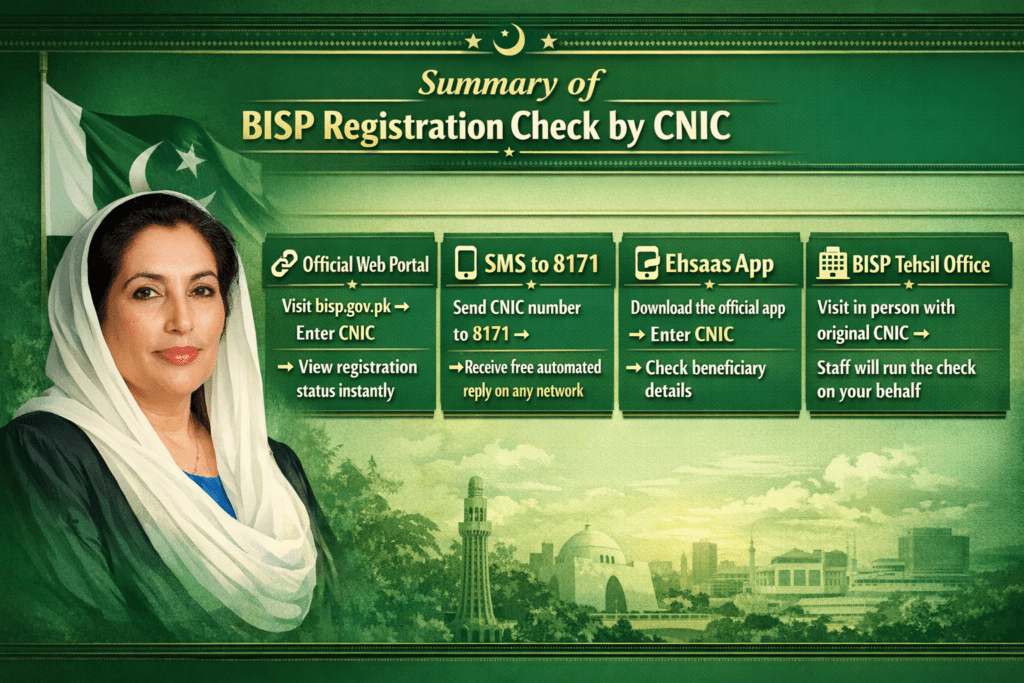
Summary: All Methods for BISP Registration Check by CNIC at a Glance
Final Thoughts
A BISP registration check by CNIC is one of the simplest yet most impactful steps any eligible family can take to secure their financial assistance. With multiple methods available — from the online portal and SMS service to the mobile app and physical offices — there is truly no barrier that should prevent a deserving household from knowing exactly where their registration stands.
The key takeaway is this: staying informed is staying empowered. By regularly verifying their registration status through a quick BISP registration check by CNIC, beneficiaries ensure that they are not missing out on support they are entitled to — and that any issues in the system are caught and resolved as quickly as possible. For families who depend on BISP payments to cover basic necessities, that kind of awareness can make all the difference.